Page 1 of 1
Where Can I Post Screenshots?
Posted: Fri Mar 14, 2014 3:53 pm
by flow4m
I suppose I have to find a place to upload screenshots to in order to post them in the gallery. Any good ways to do that. I no longer have a web site.
I just got Curvy 3D and am excited to learn it. I'm impressed with the ability to import raster with the inflate function. I've learned to bring in front and back height maps made in gimp and group them, join them and stitch them together. I like the mesh functions like Reduce, and refine. Also the ability to set the object for Divide to add triangels while sculpting.
Curvy's a great program and easy to learn.
Alan
Posted: Fri Mar 14, 2014 9:33 pm
by Simon
Hi Alan,
Welcome to the Curvy forum! Good to hear you have mastered some tricks with Curvy already

Now you've registered on the forum you can upload images to our own gallery page (separate to the "
gallery forum")
http://www.curvy3d.com/gallery/
Best to upload to your own username's gallery. Then you can insert those uploaded images to forum posts here, let me know if you get stuck, I look forward to seeing what you've been working on.
Simon
Posted: Fri Mar 14, 2014 10:55 pm
by flow4m
After I upload my files there is no choice given to put them in my gallery. So I just said Begginers.
Alan
Posted: Fri Mar 14, 2014 11:17 pm
by Simon
That's odd, I know other people post to their personal galleries (which don't need upload approval for each pic). I'll have to create a new test-user and see if I can work out how it should work.
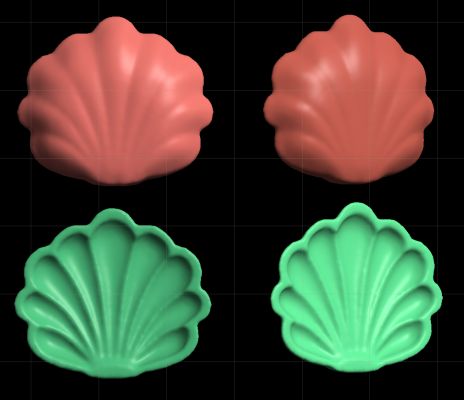
That said your uploads are now approved and they are very cool! Wonderful clean shapes and detail.
http://www.curvy3d.com/gallery/displayi ... at=0&pos=2
Posted: Sat Mar 15, 2014 4:31 am
by flow4m
Hi Simon
I was able to click the new button when I went to create a gallery and then rename the category and upload the images. I then found the url's and pasted them into the gallery forum entry but they don't seem to be inserted correctly.
I'll try it here:
[img]
http://www.curvy3d.com/gallery/displayi ... p?pos=-475
Alan[/img]
Posted: Sat Mar 15, 2014 8:31 am
by Simon
Glad to see you set up a new gallery.
To post images inline here you must right click on the image and "Copy Image Location" or similar in other browsers.
For fullsize images left click on the gallery image to expand, then right click and copy location.
This should give you an URL ending with ".JPG" or ".png" that will post properly in the forum.
Finally it is easiest to post an image by selecting the URL and clicking "Img" from the tool buttons above the forum post edit window - your img and /img tags were swapped around, the /img comes last.
Posted: Sat Mar 15, 2014 3:22 pm
by flow4m
I had to right click and go to properties and copy the url from there.

I think I got it now.
Thanks, Simon[/img]